
Publicado el Deja un comentario

Pricing and usage model updates for Amazon EC2 instances accelerated by NVIDIA GPUs

AWS announces two updates to Amazon EC2 instances accelerated by NVIDIA GPUs.

Availability of savings plans for Amazon EC2 P6-B200 instances which were available at launch only through EC2 Capacity Blocks for ML.

Reduced pricing for Amazon EC2 P5 and P5en instances and Amazon EC2 P4d and P4de instances: The following pricing reductions apply to On Demand pricing beginning June 1, 2025 and to Savings Plan purchases effective after June 4, 2025: P5 – up to 45% reduction, P5en – up to 26% reduction, and P4d and P4de – up to 33% reduction. The percentages apply to instances running Amazon Linux, slightly smaller reductions apply to instances running other operating systems. To provide increased accessibility to reduced pricing, we are also making at-scale, On-Demand capacity available for:

  • P4d in Asia Pacific (Seoul), Asia Pacific (Sydney), Canada (Central), Europe (London) Regions
  • P4de in US East (N. Virginia) Region
  • P5 in Asia Pacific (Mumbai), Asia Pacific (Tokyo), Asia Pacific (Jakarta), South America (São Paulo) Regions
  • P5en in Asia Pacific (Mumbai), Asia Pacific (Tokyo), Asia Pacific (Jakarta) Regions

The new pricing reflects AWS’s commitment to making advanced GPU computing more accessible while passing cost savings directly to customers. To learn more about the updated pricing please consult the EC2 pricing page.

 

​AWS announces two updates to Amazon EC2 instances accelerated by NVIDIA GPUs.
Availability of savings plans for Amazon EC2 P6-B200 instances which were available at launch only through EC2 Capacity Blocks for ML.
Reduced pricing for Amazon EC2 P5 and P5en instances and Amazon EC2 P4d and P4de instances: The following pricing reductions apply to On Demand pricing beginning June 1, 2025 and to Savings Plan purchases effective after June 4, 2025: P5 – up to 45% reduction, P5en – up to 26% reduction, and P4d and P4de – up to 33% reduction. The percentages apply to instances running Amazon Linux, slightly smaller reductions apply to instances running other operating systems. To provide increased accessibility to reduced pricing, we are also making at-scale, On-Demand capacity available for:

P4d in Asia Pacific (Seoul), Asia Pacific (Sydney), Canada (Central), Europe (London) Regions
P4de in US East (N. Virginia) Region
P5 in Asia Pacific (Mumbai), Asia Pacific (Tokyo), Asia Pacific (Jakarta), South America (São Paulo) Regions
P5en in Asia Pacific (Mumbai), Asia Pacific (Tokyo), Asia Pacific (Jakarta) Regions

The new pricing reflects AWS’s commitment to making advanced GPU computing more accessible while passing cost savings directly to customers. To learn more about the updated pricing please consult the EC2 pricing page.  
Publicado el Deja un comentario

Amazon EC2 now enables you to delete underlying EBS snapshots when deregistering AMIs

Amazon EC2 now enables you to automatically delete underlying Amazon EBS snapshots when deregistering Amazon Machine Images (AMIs), allowing you to better manage your storage costs and simplify your AMI cleanup workflow.

Previously, when deregistering an AMI, you had to separately delete its associated EBS snapshots, which required additional steps. This process could lead to abandoned snapshots, resulting in unnecessary storage costs and resource management overhead. Now you can automatically delete EBS snapshots at the time of AMI deregistration.

This capability is available to all customers at no additional costs, and is enabled in all AWS commercial regions including AWS GovCloud (US), AWS China (Beijing) Region, operated by Sinnet, and in the AWS China (Ningxia) Region, operated by NWCD.

You can deregister AMIs from the EC2 Console, CLI, API, or SDK, and learn more in the AMI documentation.


​Amazon EC2 now enables you to automatically delete underlying Amazon EBS snapshots when deregistering Amazon Machine Images (AMIs), allowing you to better manage your storage costs and simplify your AMI cleanup workflow. Previously, when deregistering an AMI, you had to separately delete its associated EBS snapshots, which required additional steps. This process could lead to abandoned snapshots, resulting in unnecessary storage costs and resource management overhead. Now you can automatically delete EBS snapshots at the time of AMI deregistration. This capability is available to all customers at no additional costs, and is enabled in all AWS commercial regions including AWS GovCloud (US), AWS China (Beijing) Region, operated by Sinnet, and in the AWS China (Ningxia) Region, operated by NWCD. You can deregister AMIs from the EC2 Console, CLI, API, or SDK, and learn more in the AMI documentation.  

Publicado el Deja un comentario

Amazon RDS for MariaDB now supports community MariaDB minor versions 10.11.13 and 11.4.7

Amazon Relational Database Service (Amazon RDS) for MariaDB now supports new community MariaDB minor versions 10.11.13 and 11.4.7. We recommend that you upgrade to the latest minor versions to fix known security vulnerabilities in prior versions of MariaDB, and to benefit from the bug fixes, performance improvements, and new functionality added by the MariaDB community.

You can leverage automatic minor version upgrades to automatically upgrade your databases to more recent minor versions during scheduled maintenance windows. You can also leverage Amazon RDS Managed Blue/Green deployments for safer, simpler, and faster updates to your MariaDB instances. Learn more about upgrading your database instances, including automatic minor version upgrades and Blue/Green Deployments, in the Amazon RDS User Guide.

Amazon RDS for MariaDB makes it straightforward to set up, operate, and scale MariaDB deployments in the cloud. Learn more about pricing details and regional availability at Amazon RDS for MariaDB. Create or update a fully managed Amazon RDS database in the Amazon RDS Management Console.


​Amazon Relational Database Service (Amazon RDS) for MariaDB now supports new community MariaDB minor versions 10.11.13 and 11.4.7. We recommend that you upgrade to the latest minor versions to fix known security vulnerabilities in prior versions of MariaDB, and to benefit from the bug fixes, performance improvements, and new functionality added by the MariaDB community. You can leverage automatic minor version upgrades to automatically upgrade your databases to more recent minor versions during scheduled maintenance windows. You can also leverage Amazon RDS Managed Blue/Green deployments for safer, simpler, and faster updates to your MariaDB instances. Learn more about upgrading your database instances, including automatic minor version upgrades and Blue/Green Deployments, in the Amazon RDS User Guide. Amazon RDS for MariaDB makes it straightforward to set up, operate, and scale MariaDB deployments in the cloud. Learn more about pricing details and regional availability at Amazon RDS for MariaDB. Create or update a fully managed Amazon RDS database in the Amazon RDS Management Console.  

Publicado el Deja un comentario

Amazon Connect now supports external voice transfers in five additional AWS Regions

Amazon Connect external voice transfer is now available in the Asia Pacific (Sydney), Asia Pacific (Tokyo), Canada (Central), Europe (Frankfurt), and Europe (London) AWS Regions.

Amazon Connect external voice transfer enables Amazon Connect to directly transfer voice calls and metadata to other voice systems without using the public telephone network. You can use Amazon Connect telephony and Interactive Voice Response (IVR) with your existing voice systems to help improve customer experience and reduce costs.

For the list of AWS Regions where Amazon Connect external voice transfer is available, refer to Availability of Amazon Connect features by Region in the Amazon Connect Administrator Guide.

To learn more about Amazon Connect and other voice systems, review the following resources:


​Amazon Connect external voice transfer is now available in the Asia Pacific (Sydney), Asia Pacific (Tokyo), Canada (Central), Europe (Frankfurt), and Europe (London) AWS Regions. Amazon Connect external voice transfer enables Amazon Connect to directly transfer voice calls and metadata to other voice systems without using the public telephone network. You can use Amazon Connect telephony and Interactive Voice Response (IVR) with your existing voice systems to help improve customer experience and reduce costs. For the list of AWS Regions where Amazon Connect external voice transfer is available, refer to Availability of Amazon Connect features by Region in the Amazon Connect Administrator Guide. To learn more about Amazon Connect and other voice systems, review the following resources:

Amazon Connect website and pricing
External voice transfer – Amazon Connect Administrator Guide  

Publicado el Deja un comentario

AWS Wickr announces a Preview experience for files

AWS Wickr announces the launch of Wickr File Previews. This new feature empowers organizations to protect sensitive files and lower the risk of data loss, by allowing network administrators to configure a “view-only” mode in the Security Groups section of the AWS Management Console for Wickr. Users within these security groups will be restricted to only viewing the supported files, and will be unable to download them.

AWS Wickr is a security-first messaging and collaboration service with features designed to help keep your communications secure, private, and compliant. AWS Wickr protects one-to-one and group messaging, voice and video calling, file sharing, screen sharing, and location sharing with end-to-end encryption. Customers have full administrative control over data, which includes addressing information governance polices, configuring ephemeral messaging options, and deleting credentials for lost or stolen devices. You can log internal and external conversations in an AWS Wickr network to a private data store that you manage for data retention and auditing purposes.

AWS Wickr is available in commercial AWS Regions that include US East (N. Virginia), AWS Canada (Central), AWS Asia Pacific (Malaysia, Singapore, Sydney, and Tokyo), and AWS Europe (London, Frankfurt, Stockholm, and Zurich). It is also available in AWS GovCloud (US-West) as FedRAMP High and Department of Defense Impact Level 5 (DoD IL5)-authorized AWS WickrGov.

To learn more and get started, see the following resources:


​AWS Wickr announces the launch of Wickr File Previews. This new feature empowers organizations to protect sensitive files and lower the risk of data loss, by allowing network administrators to configure a “view-only” mode in the Security Groups section of the AWS Management Console for Wickr. Users within these security groups will be restricted to only viewing the supported files, and will be unable to download them. AWS Wickr is a security-first messaging and collaboration service with features designed to help keep your communications secure, private, and compliant. AWS Wickr protects one-to-one and group messaging, voice and video calling, file sharing, screen sharing, and location sharing with end-to-end encryption. Customers have full administrative control over data, which includes addressing information governance polices, configuring ephemeral messaging options, and deleting credentials for lost or stolen devices. You can log internal and external conversations in an AWS Wickr network to a private data store that you manage for data retention and auditing purposes. AWS Wickr is available in commercial AWS Regions that include US East (N. Virginia), AWS Canada (Central), AWS Asia Pacific (Malaysia, Singapore, Sydney, and Tokyo), and AWS Europe (London, Frankfurt, Stockholm, and Zurich). It is also available in AWS GovCloud (US-West) as FedRAMP High and Department of Defense Impact Level 5 (DoD IL5)-authorized AWS WickrGov. To learn more and get started, see the following resources:

AWS Wickr product detail page
AWS Wickr user guide
AWS Wickr administration guide  

Publicado el Deja un comentario

AWS HealthOmics now supports automatic detection of WDL workflow parameters

Today, AWS HealthOmics announces automatic parameter interpolation for Workflow Description Language (WDL) workflows to help streamline the workflow creation process. This new capability automatically identifies and extracts required and optional parameters along with their descriptions directly from WDL workflow definitions, eliminating the need for customers to manually create input parameter templates. AWS HealthOmics is a HIPAA-eligible service that helps healthcare and life sciences customers accelerate scientific breakthroughs with fully managed biological data stores and workflows.

Removing the need to define parameters simplifies and accelerates building and deploying bioinformatics workflows. Customers can now onboard new WDL workflows more rapidly while retaining complete flexibility through optional customization. For organizations with extensive WDL workflow libraries, this feature significantly reduces the time required to migrate or deploy new workflows. Additionally, HealthOmics customers still maintain full control by providing custom input parameter templates when needed to override the automatic interpolation.

Input parameter interpolation for WDL workflows is now supported in all regions where AWS HealthOmics is available: US East (N. Virginia), US West (Oregon), Europe (Frankfurt, Ireland, London), Asia Pacific (Singapore), and Israel (Tel Aviv).

To learn more about automatic parameter interpolation and how to implement WDL workflows, see the AWS HealthOmics documentation.


​Today, AWS HealthOmics announces automatic parameter interpolation for Workflow Description Language (WDL) workflows to help streamline the workflow creation process. This new capability automatically identifies and extracts required and optional parameters along with their descriptions directly from WDL workflow definitions, eliminating the need for customers to manually create input parameter templates. AWS HealthOmics is a HIPAA-eligible service that helps healthcare and life sciences customers accelerate scientific breakthroughs with fully managed biological data stores and workflows. Removing the need to define parameters simplifies and accelerates building and deploying bioinformatics workflows. Customers can now onboard new WDL workflows more rapidly while retaining complete flexibility through optional customization. For organizations with extensive WDL workflow libraries, this feature significantly reduces the time required to migrate or deploy new workflows. Additionally, HealthOmics customers still maintain full control by providing custom input parameter templates when needed to override the automatic interpolation. Input parameter interpolation for WDL workflows is now supported in all regions where AWS HealthOmics is available: US East (N. Virginia), US West (Oregon), Europe (Frankfurt, Ireland, London), Asia Pacific (Singapore), and Israel (Tel Aviv). To learn more about automatic parameter interpolation and how to implement WDL workflows, see the AWS HealthOmics documentation.    

Publicado el Deja un comentario

Amazon Managed Service for Prometheus now available in 7 additional AWS Regions

Amazon Managed Service for Prometheus is now available in Africa (Cape Town), Asia Pacific (Thailand), Asia Pacific (Hong Kong), Asia Pacific (Malaysia), Europe (Milan), Europe (Zurich), and Middle East (UAE). Amazon Managed Service for Prometheus is a fully managed Prometheus-compatible monitoring service that makes it easy to monitor and alarm on operational metrics at scale.

The list of all supported regions where Amazon Managed Service for Prometheus is generally available can be found on the user guide. Customers can send up to 1 billion active metrics to a single workspace and can create many workspaces per account, where a workspace is a logical space dedicated to the storage and querying of Prometheus metrics.

To learn more about Amazon Managed Service for Prometheus collector, visit the user guide or product page.


​Amazon Managed Service for Prometheus is now available in Africa (Cape Town), Asia Pacific (Thailand), Asia Pacific (Hong Kong), Asia Pacific (Malaysia), Europe (Milan), Europe (Zurich), and Middle East (UAE). Amazon Managed Service for Prometheus is a fully managed Prometheus-compatible monitoring service that makes it easy to monitor and alarm on operational metrics at scale. The list of all supported regions where Amazon Managed Service for Prometheus is generally available can be found on the user guide. Customers can send up to 1 billion active metrics to a single workspace and can create many workspaces per account, where a workspace is a logical space dedicated to the storage and querying of Prometheus metrics. To learn more about Amazon Managed Service for Prometheus collector, visit the user guide or product page.    

Publicado el Deja un comentario

Amazon CloudWatch Logs Insights launches Query Results Summarization and OpenSearch PPL enhancements

Amazon CloudWatch Logs Insights launches Query Results Summarization and OpenSearch PPL enhancements to help accelerate your logs analysis.

The new logs summarizer generates a natural language summary of the query results, providing users with clear, actionable insights. Interpreting log entries can be time-consuming and this natural language summarization capability transforms complex query results into clear, concise summaries that help you quickly identify issues and gain actionable insights from your log data.

With CloudWatch Logs Insights, you can interactively search and analyze your logs with Logs Insights query language, OpenSearch Service Piped Processing Language (PPL), and OpenSearch Service Structured Query Language (SQL). Customers using OpenSearch PPL can now analyze their logs more efficiently with new PPL commands and functions such as JOIN, SubQuery, Fillnull, Expand, Flatten, Cidrmatch and JSON functions. These new capabilities help accelerate your troubleshooting. For example, you can use subqueries to find those services which have more than 20 errors in the last day using an inner query, and then use the results of the inner query to get the average response times of those services from a different log group.

The logs summarizer is available in the US East (N. Virginia) region. OpenSearch PPL query enhancements are available in regions where OpenSearch Service direct query is available.

To learn about the log summarizer in CloudWatch Logs Insights, visit the Amazon CloudWatch Logs documentation. To learn about the new PPL commands and functions, visit the CloudWatch Logs documentation.


​Amazon CloudWatch Logs Insights launches Query Results Summarization and OpenSearch PPL enhancements to help accelerate your logs analysis. The new logs summarizer generates a natural language summary of the query results, providing users with clear, actionable insights. Interpreting log entries can be time-consuming and this natural language summarization capability transforms complex query results into clear, concise summaries that help you quickly identify issues and gain actionable insights from your log data. With CloudWatch Logs Insights, you can interactively search and analyze your logs with Logs Insights query language, OpenSearch Service Piped Processing Language (PPL), and OpenSearch Service Structured Query Language (SQL). Customers using OpenSearch PPL can now analyze their logs more efficiently with new PPL commands and functions such as JOIN, SubQuery, Fillnull, Expand, Flatten, Cidrmatch and JSON functions. These new capabilities help accelerate your troubleshooting. For example, you can use subqueries to find those services which have more than 20 errors in the last day using an inner query, and then use the results of the inner query to get the average response times of those services from a different log group. The logs summarizer is available in the US East (N. Virginia) region. OpenSearch PPL query enhancements are available in regions where OpenSearch Service direct query is available. To learn about the log summarizer in CloudWatch Logs Insights, visit the Amazon CloudWatch Logs documentation. To learn about the new PPL commands and functions, visit the CloudWatch Logs documentation.  

Publicado el Deja un comentario

Amazon OpenSearch Serverless now available in Asia Pacific (Hyderabad) and Asia Pacific (Osaka) regions

We are excited to announce that Amazon OpenSearch Serverless is now available in Asia Pacific (Hyderabad) and Asia Pacific (Osaka) regions. OpenSearch Serverless is a serverless deployment option for Amazon OpenSearch Service that makes it simple to run search and analytics workloads without the complexities of infrastructure management. OpenSearch Serverless’ compute capacity used for data ingestion, search, and query is measured in OpenSearch Compute Units (OCUs). To control costs, customers can configure the maximum number of OCUs per account.

Please refer to the AWS Regional Services List for more information about Amazon OpenSearch Service availability. To learn more about OpenSearch Serverless, see the documentation.


​We are excited to announce that Amazon OpenSearch Serverless is now available in Asia Pacific (Hyderabad) and Asia Pacific (Osaka) regions. OpenSearch Serverless is a serverless deployment option for Amazon OpenSearch Service that makes it simple to run search and analytics workloads without the complexities of infrastructure management. OpenSearch Serverless’ compute capacity used for data ingestion, search, and query is measured in OpenSearch Compute Units (OCUs). To control costs, customers can configure the maximum number of OCUs per account. Please refer to the AWS Regional Services List for more information about Amazon OpenSearch Service availability. To learn more about OpenSearch Serverless, see the documentation.  

Publicado el Deja un comentario

Microsoft Edge Game Assist ya está disponible

junio 5, 2025

Microsoft Edge Game Assist ya está disponible

Vista desde atrás de un gamer con una diadema, jugando frente a un monitor

Por: Roger Capriotti.

Estamos encantados de anunciar que Microsoft Edge Game Assist ya está disponible para todos en Windows 11. Anunciamos la vista previa de este navegador en el juego, creado para juegos de PC, el pasado mes de noviembre y, desde entonces, hemos recibido valiosos comentarios para hacerlo aún mejor. Solo disponible con Microsoft Edge, Game Assist está aquí para ayudarlos a mantenerse en el juego, para desbloquear una forma más inteligente de jugar y navegar.

Entremos en materia.

Diseñado para una experiencia de juego fluida e inmersiva

Sabemos que mantener la concentración en su juego es importante, pero también deben buscar guías de juego, conectarse con amigos o incluso escuchar música si quieren mientras juegan. Alt-Tabbing del juego al escritorio es una práctica común, pero te saca de tu experiencia inmersiva. Según el juego, también puede ser bastante lento o incluso puede causar problemas con el juego. Por eso, nos complace anunciar que Microsoft Edge Game Assist está disponible en todo el mundo1, lo que les permite acceder con rapidez a la web sin salir de su juego. Digan adiós a Alt-Tab y solo presionen Win + G para abrir la barra de juegos y comenzar a usar Microsoft Edge para una experiencia más fluida e inmersiva.

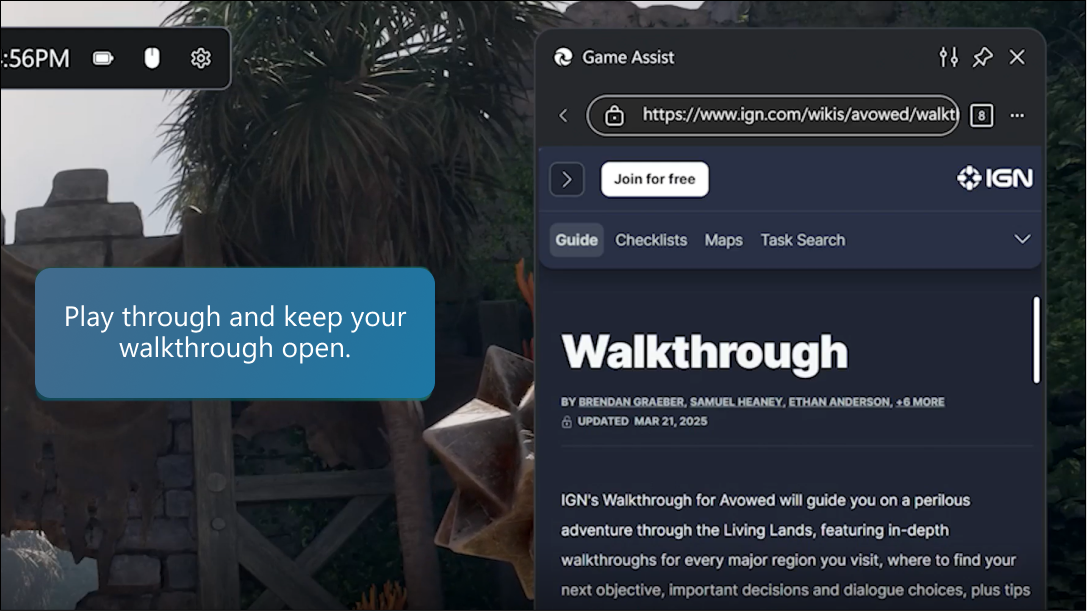
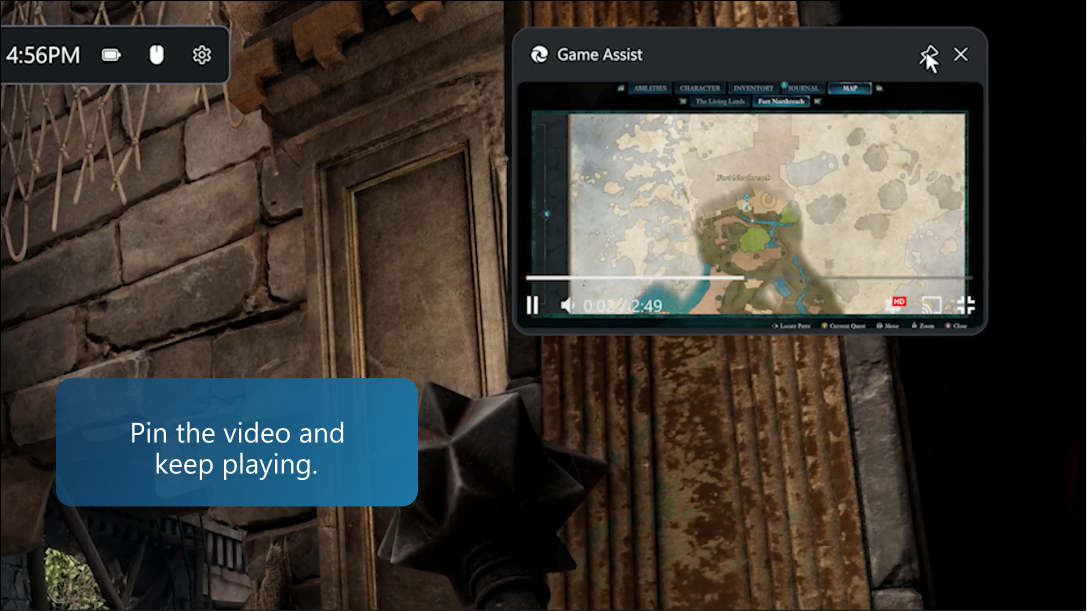
Game Assist es el primer navegador para juegos creado en específico con los jugadores de PC en mente, con consejos y guías para muchos de los mejores juegos de PC, fácil acceso a sitios esenciales como Discord, Spotify y Twitch, y más, todo en su juego. Todo lo que necesitan está en una sola pantalla para que puedan concentrarse en la acción sin interrupciones. También pueden anclar Game Assist encima de su juego para consultar guías o ver videos mientras juegan. Y como está conectado a su navegador Edge, tendrán acceso instantáneo a sus favoritos, contraseñas, historial y mucho más, lo que garantiza que todo lo que necesitan esté siempre a su alcance.

Obtengan ayuda para navegar por un nivel desafiante

A todos nos ha pasado. Están inmersos en un juego y de repente se quedan atrapados en un nivel difícil. En lugar de dejar el juego y la tecla Alt-Tab para buscar una guía de juego, solo presionen Win+G para iniciar Microsoft Edge Game Assist y encontrar lo que necesitan. Game Assist también está atento al juego y les sugerirá consejos y guías cuando jueguen a juegos mejorados2, lo que les ayudará a aprovechar al máximo cada sesión. Echen un vistazo rápido a la guía y luego cierren la barra de juegos para continuar con su juego o fijen el tutorial encima del juego para que puedan seguirlo mientras juegan. Game Assist también facilita la búsqueda en la Web (o en un sitio) al completar en automático el nombre de su juego cuando presionan Ctrl+G o seleccionan Pegar título del juego en el menú contextual.

Captura de pantalla de Game Assist

Lo que necesitan en un solo lugar

Microsoft Edge Game Assist es más que solo guías. La multitarea mientras juegan es bastante común, ya sea que chateen con amigos, escuchen un podcast, vean un programa de televisión, saquen sus notas de búsqueda o tan solo busquen algo mientras esperan a reaparecer. Con Microsoft Edge Game Assist, vamos a incorporar toda la web a su juego. Accedan a sus sitios favoritos como Discord o Twitch, miren una transmisión en vivo en imagen o entren en la zona con la lista de reproducción perfecta de Spotify. Todo está diseñado para ayudarlos a mantenerse en su juego, realizar múltiples tareas con facilidad y acceder a la web cuando lo necesiten.

Captura de pantalla de Game Assist

Sus comentarios nos ayudan a pasar al siguiente nivel

Sus comentarios durante la fase de vista previa fueron invaluables. Hemos leído sus sugerencias, hemos hecho un seguimiento de los informes de errores y hemos respondido siempre que hemos podido. Con su ayuda, hemos mejorado el aspecto de Game Assist, al simplificar la interfaz para centrarse más en la página web. Hemos mejorado Game Assist para más de 80 juegos, hemos añadido atajos de teclado, incluido el mencionado Pegar título del juego, y hemos añadido un fácil acceso a favoritos, historial e incluso extensiones. Creemos que este progreso ha mejorado la experiencia, y les pedimos que sigan enviándonos comentarios para ayudarnos a mejorarla aún más.

Esperamos que estén tan entusiasmados con Game Assist (y con decir adiós a Alt-Tab) como nosotros. Solo tienen que pulsar Win+G para abrir la barra de juegos y empezar a usar Microsoft Edge Game Assist u obtener más información. Tanto si son fanáticos de Edge desde hace un tiempo (¡gracias!) como si esta es su primera experiencia con nuestro navegador, asegúrense de explorar todo lo que Microsoft Edge con tecnología de IA tiene para ofrecer para ayudarlos a sacar más partido a su experiencia en línea.

1Game Assist está disponible donde Edge está disponible. El contenido mejorado del juego solo está disponible en inglés en este momento. La experiencia de Game Assist también puede variar según el juego y la geografía.
2Lista de juegos mejorados

The post Microsoft Edge Game Assist ya está disponible appeared first on Source LATAM.


​The post Microsoft Edge Game Assist ya está disponible appeared first on Source LATAM.