AWS Lambda now supports remote debugging in Visual Studio Code (VS Code), enabling developers to debug their Lambda functions running in the cloud directly from their local IDE. With this new capability, developers can use familiar debugging tools like breakpoints, variable inspection, and step-through debugging with functions deployed in the cloud without modifying their existing development workflow, thus accelerating their serverless development process.
Developers building serverless applications with Lambda often need to test and debug cross-service integrations involving multiple AWS services that may be attached to Amazon Virtual Private Cloud (VPC) or require specific AWS Identity and Access Management (IAM) permissions. Previously, in absence of tools to fully replicate the Lambda runtime environment and its interactions with other AWS services locally, developers had to rely on print statements, logs, and multiple iterative deployments to diagnose and resolve issues. With remote debugging in VS Code, developers can now debug the execution environment of the function running in the cloud with complete access to VPC resources and IAM roles and trace execution through entire service flows in the cloud. Developers can also quickly make updates to their function and test the changes. This launch eliminates the need for complex local debugging setups and repeated deployments, reducing the time to identify and fix issues from hours to minutes.
This feature is now available to all developers with the AWS Toolkit (v3.69.0 or later) installed on their VS Code, at no additonal cost. To get started, select a Lambda function in VS Code IDE and click “Invoke Remotely”. You can then start a remote debugging session with a single click. The AWS Toolkit will automatically download the function code, establish a secure debugging connection, and enable breakpoint setting. To learn more, visit the AWS News blog post, AWS Toolkit documentation, and Lambda developer guide.
AWS Lambda now supports remote debugging in Visual Studio Code (VS Code), enabling developers to debug their Lambda functions running in the cloud directly from their local IDE. With this new capability, developers can use familiar debugging tools like breakpoints, variable inspection, and step-through debugging with functions deployed in the cloud without modifying their existing development workflow, thus accelerating their serverless development process. Developers building serverless applications with Lambda often need to test and debug cross-service integrations involving multiple AWS services that may be attached to Amazon Virtual Private Cloud (VPC) or require specific AWS Identity and Access Management (IAM) permissions. Previously, in absence of tools to fully replicate the Lambda runtime environment and its interactions with other AWS services locally, developers had to rely on print statements, logs, and multiple iterative deployments to diagnose and resolve issues. With remote debugging in VS Code, developers can now debug the execution environment of the function running in the cloud with complete access to VPC resources and IAM roles and trace execution through entire service flows in the cloud. Developers can also quickly make updates to their function and test the changes. This launch eliminates the need for complex local debugging setups and repeated deployments, reducing the time to identify and fix issues from hours to minutes. This feature is now available to all developers with the AWS Toolkit (v3.69.0 or later) installed on their VS Code, at no additonal cost. To get started, select a Lambda function in VS Code IDE and click “Invoke Remotely”. You can then start a remote debugging session with a single click. The AWS Toolkit will automatically download the function code, establish a secure debugging connection, and enable breakpoint setting. To learn more, visit the AWS News blog post, AWS Toolkit documentation, and Lambda developer guide.
AWS Lambda now enables seamless transition from console to Visual Studio Code (VS Code) IDE. This new console-to-IDE integration eliminates the friction between cloud and local development environments for serverless applications.
Developers starting in the console require more sophisticated development capabilities of local IDE as applications evolve in complexity. Previously, they had to manually configure their local development environment which included IDE installation, copying function code, configurations, and integration settings before they could begin development. This was time-consuming and interrupted development workflow. With the new console-to-IDE integration, developers can now transition their Lambda functions to VS Code with a single click, preserving code and configurations. This enables developers to use advanced IDE capabilities like external dependency management (using package managers like npm and pip), using development tools like linters and formatters, etc., without the setup overhead. This launch also introduces a new capability in VS Code IDE which enables developers to easily convert their applications to an AWS Serverless Application Model (AWS SAM) templates, simplifying their Infrastructure as Code (IaC) practices and CI/CD pipeline integration.
To get started, click the «Open in Visual Studio Code» button in the Lambda console’s Code tab or the Getting Started popup when creating new functions. This will automatically open VS Code IDE on your local device or take you through a guided process to install required tools including VS Code and AWS Toolkit. To learn more about this experience, visit the AWS News blog post, Lambda developer guide, and AWS Toolkit for VS Code documentation.
This feature is available in all commercial AWS Regions where Lambda is available, except AWS GovCloud (US) Regions, at no additional cost.
AWS Lambda now enables seamless transition from console to Visual Studio Code (VS Code) IDE. This new console-to-IDE integration eliminates the friction between cloud and local development environments for serverless applications. Developers starting in the console require more sophisticated development capabilities of local IDE as applications evolve in complexity. Previously, they had to manually configure their local development environment which included IDE installation, copying function code, configurations, and integration settings before they could begin development. This was time-consuming and interrupted development workflow. With the new console-to-IDE integration, developers can now transition their Lambda functions to VS Code with a single click, preserving code and configurations. This enables developers to use advanced IDE capabilities like external dependency management (using package managers like npm and pip), using development tools like linters and formatters, etc., without the setup overhead. This launch also introduces a new capability in VS Code IDE which enables developers to easily convert their applications to an AWS Serverless Application Model (AWS SAM) templates, simplifying their Infrastructure as Code (IaC) practices and CI/CD pipeline integration. To get started, click the «Open in Visual Studio Code» button in the Lambda console’s Code tab or the Getting Started popup when creating new functions. This will automatically open VS Code IDE on your local device or take you through a guided process to install required tools including VS Code and AWS Toolkit. To learn more about this experience, visit the AWS News blog post, Lambda developer guide, and AWS Toolkit for VS Code documentation. This feature is available in all commercial AWS Regions where Lambda is available, except AWS GovCloud (US) Regions, at no additional cost.
Amazon DynamoDB Streams now supports a new ShardFilter parameter in the DescribeStream API to simplify and optimize the consumption of streaming data. You can use ShardFilter parameter to quickly discover child shards after a parent shard has been closed, significantly improving efficiency and responsiveness when processing data from DynamoDB Streams.
DynamoDB Streams is a serverless data streaming feature that makes it straightforward to track, process, and react to item-level changes in DynamoDB tables in near real time. DynamoDB Streams enables diverse change data capture use cases, including building event-driven applications, data replication, auditing, and implementing data analytics and machine learning capabilities. Applications consuming data from DynamoDB Streams can efficiently transition from reading a closed shard to its child shard using this optional ShardFilter parameter, avoiding repeated calls to the DescribeStream API to retrieve and traverse the shard map for all closed and open shards. This API enhancement helps ensure smoother transitions and lower latency when switching between shards, making your stream processing applications more responsive and cost-effective.
The new ShardFilter parameter is available in all AWS Regions. You can get started with the feature by using the AWS API, Kinesis Client Library (KCL) 3.0, or Apache Flink connector for DynamoDB Streams. Customers that use AWS Lambda to consume DynamoDB Streams will automatically benefit from this enhanced API experience.
Amazon DynamoDB Streams now supports a new ShardFilter parameter in the DescribeStream API to simplify and optimize the consumption of streaming data. You can use ShardFilter parameter to quickly discover child shards after a parent shard has been closed, significantly improving efficiency and responsiveness when processing data from DynamoDB Streams. DynamoDB Streams is a serverless data streaming feature that makes it straightforward to track, process, and react to item-level changes in DynamoDB tables in near real time. DynamoDB Streams enables diverse change data capture use cases, including building event-driven applications, data replication, auditing, and implementing data analytics and machine learning capabilities. Applications consuming data from DynamoDB Streams can efficiently transition from reading a closed shard to its child shard using this optional ShardFilter parameter, avoiding repeated calls to the DescribeStream API to retrieve and traverse the shard map for all closed and open shards. This API enhancement helps ensure smoother transitions and lower latency when switching between shards, making your stream processing applications more responsive and cost-effective. The new ShardFilter parameter is available in all AWS Regions. You can get started with the feature by using the AWS API, Kinesis Client Library (KCL) 3.0, or Apache Flink connector for DynamoDB Streams. Customers that use AWS Lambda to consume DynamoDB Streams will automatically benefit from this enhanced API experience. For more information, refer to Working with DynamoDB Streams in the DynamoDB Developer Guide and API Reference for DescribeStream.
Today, DynamoDB local, the downloadable version of Amazon DynamoDB, migrates to AWS SDK for Java 2.x. In alignment with our SDKs and Tools Maintenance Policy, this migration ensures DynamoDB local stays up-to-date in security, compatibility, and stability for developers developing and testing their DynamoDB applications locally. With the new DynamoDB local version 3.0.0, now you can fully remove the dependency on the AWS SDK for Java 1.x. You can upgrade your application utilizing previous DynamoDB local versions to DynamoDB local 3.0.0 by making these following updates to your codebase:
All import statements referencing the current com.amazonaws namespace needs to be updated to the new software.amazon.dynamodb namespace.
If running DynamoDB local as an Apache Maven dependency, reference the new DynamoDB Maven repository in your application’s Project Object Model (POM) file. See DynamoDB Local Sample Java Project.
If running DynamoDB local in embedded mode using client class name AmazonDynamoDB, reference Client Changes on how to migrate from AWS SDK version 1 to AWS SDK version 2.
Today, DynamoDB local, the downloadable version of Amazon DynamoDB, migrates to AWS SDK for Java 2.x. In alignment with our SDKs and Tools Maintenance Policy, this migration ensures DynamoDB local stays up-to-date in security, compatibility, and stability for developers developing and testing their DynamoDB applications locally. With the new DynamoDB local version 3.0.0, now you can fully remove the dependency on the AWS SDK for Java 1.x. You can upgrade your application utilizing previous DynamoDB local versions to DynamoDB local 3.0.0 by making these following updates to your codebase:
All import statements referencing the current com.amazonaws namespace needs to be updated to the new software.amazon.dynamodb namespace.
If running DynamoDB local as an Apache Maven dependency, reference the new DynamoDB Maven repository in your application’s Project Object Model (POM) file. See DynamoDB Local Sample Java Project.
If running DynamoDB local in embedded mode using client class name AmazonDynamoDB, reference Client Changes on how to migrate from AWS SDK version 1 to AWS SDK version 2.
To learn more about the AWS SDK for Java 2.x, see AWS SDK for Java 2.x. For more information about DynamoDB local, see Setting Up DynamoDB Local (Downloadable Version).
Amazon Elastic Container Service (Amazon ECS) announces new features that make software updates for your containerized applications safer, allowing you to ship software faster and with high confidence, without needing to build custom deployment tooling. Amazon ECS now supports a built-in blue/green deployment strategy and deployment lifecycle hooks that allow you to test new application versions in production environments and quickly rollback failed deployments.
You can now deploy software updates to Amazon ECS services which serve traffic from an Application Load Balancer (ALB), Network Load Balancer (NLB), or ECS Service Connect with a blue/green deployment strategy. When you use a blue/green deployment strategy, Amazon ECS provisions the new application version alongside the old, and allows you to validate the new application version before routing production traffic to it. You can use deployment lifecycle hooks to perform custom validation steps, and block the deployment until validation succeeds. Furthermore, once production traffic has been shifted, you can let the new application bake for a pre-specified period, and rollback to the old version without incurring downtime if you detect a regression. To detect failures automatically, you can configure Amazon CloudWatch Alarms and ECS deployment circuit breaker to monitor your deployments. Together, these capabilities help make your software updates safer, allowing you to ship new capabilities faster.
You can use blue/green deployments and deployment lifecycle hooks for new and existing Amazon ECS services in all commercial AWS Regions using the AWS Management Console, SDK, CLI, CloudFormation, CDK, and Terraform by following the steps on the blog. For more details, see our documentation.
Amazon Elastic Container Service (Amazon ECS) announces new features that make software updates for your containerized applications safer, allowing you to ship software faster and with high confidence, without needing to build custom deployment tooling. Amazon ECS now supports a built-in blue/green deployment strategy and deployment lifecycle hooks that allow you to test new application versions in production environments and quickly rollback failed deployments. You can now deploy software updates to Amazon ECS services which serve traffic from an Application Load Balancer (ALB), Network Load Balancer (NLB), or ECS Service Connect with a blue/green deployment strategy. When you use a blue/green deployment strategy, Amazon ECS provisions the new application version alongside the old, and allows you to validate the new application version before routing production traffic to it. You can use deployment lifecycle hooks to perform custom validation steps, and block the deployment until validation succeeds. Furthermore, once production traffic has been shifted, you can let the new application bake for a pre-specified period, and rollback to the old version without incurring downtime if you detect a regression. To detect failures automatically, you can configure Amazon CloudWatch Alarms and ECS deployment circuit breaker to monitor your deployments. Together, these capabilities help make your software updates safer, allowing you to ship new capabilities faster.
You can use blue/green deployments and deployment lifecycle hooks for new and existing Amazon ECS services in all commercial AWS Regions using the AWS Management Console, SDK, CLI, CloudFormation, CDK, and Terraform by following the steps on the blog. For more details, see our documentation.
Amazon S3 Multi-Region Access Points are now available in 12 additional AWS opt-in Regions: Asia Pacific (Jakarta, Hong Kong, Hyderabad, and Melbourne), Europe (Zurich, Spain, and Milan), Middle East (Bahrain and UAE), Canada West (Calgary), Africa (Cape Town) and Israel (Tel Aviv) Regions.
To get started, you need to first enable the AWS opt-in Region for your account by using the steps outlined here. Next, you can use the AWS CLI or AWS SDK to create an S3 Multi-Region Access Point in an AWS opt-in Region. For pricing information, visit the Amazon S3 pricing page. To learn more about S3 Multi-Region Access Points, visit the feature page, S3 User Guide, or S3 FAQs.
Amazon S3 Multi-Region Access Points are now available in 12 additional AWS opt-in Regions: Asia Pacific (Jakarta, Hong Kong, Hyderabad, and Melbourne), Europe (Zurich, Spain, and Milan), Middle East (Bahrain and UAE), Canada West (Calgary), Africa (Cape Town) and Israel (Tel Aviv) Regions. To get started, you need to first enable the AWS opt-in Region for your account by using the steps outlined here. Next, you can use the AWS CLI or AWS SDK to create an S3 Multi-Region Access Point in an AWS opt-in Region. For pricing information, visit the Amazon S3 pricing page. To learn more about S3 Multi-Region Access Points, visit the feature page, S3 User Guide, or S3 FAQs.
AWS Lambda now supports low latency (sub 100ms) event processing for Amazon Managed Streaming for Apache Kafka (Amazon MSK) and self-managed Apache Kafka event sources in Provisioned mode for Kafka ESM. Customers can now set their MaximumBatchingWindowInSeconds parameter to 0 in Kafka ESM configurations, enabling real-time processing of Kafka events. This enhancement significantly reduces end-to-end processing latency for time-sensitive business applications.
Kafka customers increasingly build mission-critical applications that require consistent end-to-end latency of less than 100ms to meet stringent business requirements across industries. Examples include financial services firms processing market data feeds and executing algorithmic trades, e-commerce platforms providing real-time personalized recommendations, and gaming companies managing live player interactions. With today’s launch, Lambda natively supports low latency event processing with efficient optimization of polling and invoking Kafka events, allowing customers’ to build mission-critical or latency-sensitive Kafka applications on Lambda. With MaximumBatchingWindowInSeconds set to 0, Kafka ESM invokes the function with Kafka events immediately after the previous invocation completes. This configuration makes end-to-end latency solely dependent on function duration, thus potentially providing average 50ms end-to-end latencies for critical real-time applications.
This feature is generally available in all AWS Commercial Regions where AWS Lambda Kafka ESM is available, except Israel (Tel Aviv), Asia Pacific (Malaysia), and Canada West (Calgary).
To enable your Kafka ESM for low latency processing, set MaximumBatchingWindowInSeconds set to 0 and enable Provisioned mode for your new or existing Kafka ESM in the ESM API, AWS Console, AWS CLI, AWS SDK, AWS CloudFormation, and AWS SAM. To learn more, read Lambda ESM documentation and AWS Lambda pricing.
AWS Lambda now supports low latency (sub 100ms) event processing for Amazon Managed Streaming for Apache Kafka (Amazon MSK) and self-managed Apache Kafka event sources in Provisioned mode for Kafka ESM. Customers can now set their MaximumBatchingWindowInSeconds parameter to 0 in Kafka ESM configurations, enabling real-time processing of Kafka events. This enhancement significantly reduces end-to-end processing latency for time-sensitive business applications. Kafka customers increasingly build mission-critical applications that require consistent end-to-end latency of less than 100ms to meet stringent business requirements across industries. Examples include financial services firms processing market data feeds and executing algorithmic trades, e-commerce platforms providing real-time personalized recommendations, and gaming companies managing live player interactions. With today’s launch, Lambda natively supports low latency event processing with efficient optimization of polling and invoking Kafka events, allowing customers’ to build mission-critical or latency-sensitive Kafka applications on Lambda. With MaximumBatchingWindowInSeconds set to 0, Kafka ESM invokes the function with Kafka events immediately after the previous invocation completes. This configuration makes end-to-end latency solely dependent on function duration, thus potentially providing average 50ms end-to-end latencies for critical real-time applications. This feature is generally available in all AWS Commercial Regions where AWS Lambda Kafka ESM is available, except Israel (Tel Aviv), Asia Pacific (Malaysia), and Canada West (Calgary). To enable your Kafka ESM for low latency processing, set MaximumBatchingWindowInSeconds set to 0 and enable Provisioned mode for your new or existing Kafka ESM in the ESM API, AWS Console, AWS CLI, AWS SDK, AWS CloudFormation, and AWS SAM. To learn more, read Lambda ESM documentation and AWS Lambda pricing.
The Amazon Connect agent workspace now includes an out-of-box analytics dashboard that provides agents with insights into their individual performance, such as contacts handled and average handle time. The dashboard also show agents their assigned queue metrics, such as contacts in queue and longest wait time. These insights help agents improve their performance and make decisions that enhance customer experience. For example, agents can delay breaks when they observe high queue volumes, helping to reduce customer wait times.
Amazon Connect agent workspace analytics dashboard is available in the following AWS regions: US East (N. Virginia), US West (Oregon), Canada (Central), Africa (Cape Town), Asia Pacific (Seoul), Asia Pacific (Singapore), Asia Pacific (Sydney), Asia Pacific (Tokyo), Europe (Frankfurt), and Europe (London). To learn more and get started, visit the webpage and documentation.
The Amazon Connect agent workspace now includes an out-of-box analytics dashboard that provides agents with insights into their individual performance, such as contacts handled and average handle time. The dashboard also show agents their assigned queue metrics, such as contacts in queue and longest wait time. These insights help agents improve their performance and make decisions that enhance customer experience. For example, agents can delay breaks when they observe high queue volumes, helping to reduce customer wait times. Amazon Connect agent workspace analytics dashboard is available in the following AWS regions: US East (N. Virginia), US West (Oregon), Canada (Central), Africa (Cape Town), Asia Pacific (Seoul), Asia Pacific (Singapore), Asia Pacific (Sydney), Asia Pacific (Tokyo), Europe (Frankfurt), and Europe (London). To learn more and get started, visit the webpage and documentation.
Surface Copilot+ PC: diseñado para la enseñanza, el aprendizaje y la seguridad
Por: Sandra Andrews, directora general de Global Surface Go-To-Market.
Los educadores de hoy en día navegan más que nunca. Apoyan las diversas necesidades de los estudiantes, al integrar nuevas tecnologías y gestionar complejas demandas de TI y seguridad, al tiempo que mantienen a los estudiantes comprometidos y preparados para un mundo que cambia con rapidez.
Ahora, con el auge de la IA, las expectativas son aún mayores. Se pide a los líderes escolares y educadores que definan cómo se utilizará la IA en las aulas para apoyar el aprendizaje, mejorar las operaciones y promover la equidad. Ese recorrido comienza con los dispositivos adecuados.
Los equipos Microsoft Surface Copilot+ reúnen lo mejor de Microsoft (hardware, software e inteligencia artificial) para ayudar a las escuelas a superar este desafío. Basado en los comentarios de los educadores y con la tecnología de Microsoft Copilot y una unidad de procesamiento neuronal (NPU, por sus siglas en inglés) integrada, Surface permite experiencias inteligentes que se ejecutan de forma segura en el dispositivo o en la nube, todo ello gestionado sin problemas por el departamento de TI.
Lo que escuchamos en el aula, reflejado en los dispositivos
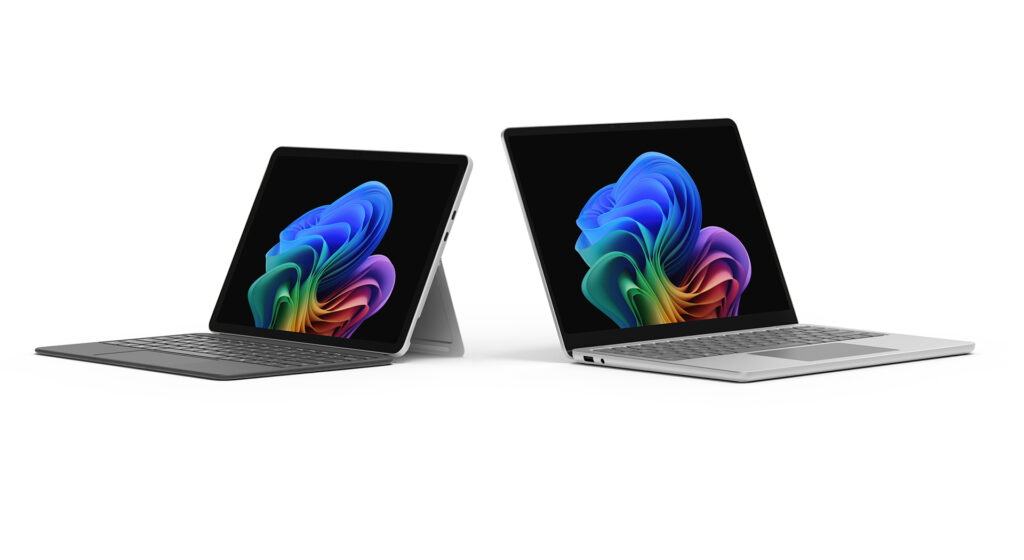
Los educadores nos dijeron que necesitan herramientas que se sientan naturales de usar y que ofrezcan las capacidades más recientes. Necesitan dispositivos que sean confiables, confiables y fáciles de administrar, con experiencias que se adapten a todos los estudiantes. Esa información dio forma al diseño de los PC Surface Copilot+, incluidos los nuevos Surface Pro de 12 pulgadas y Surface Laptop de 13 pulgadas.
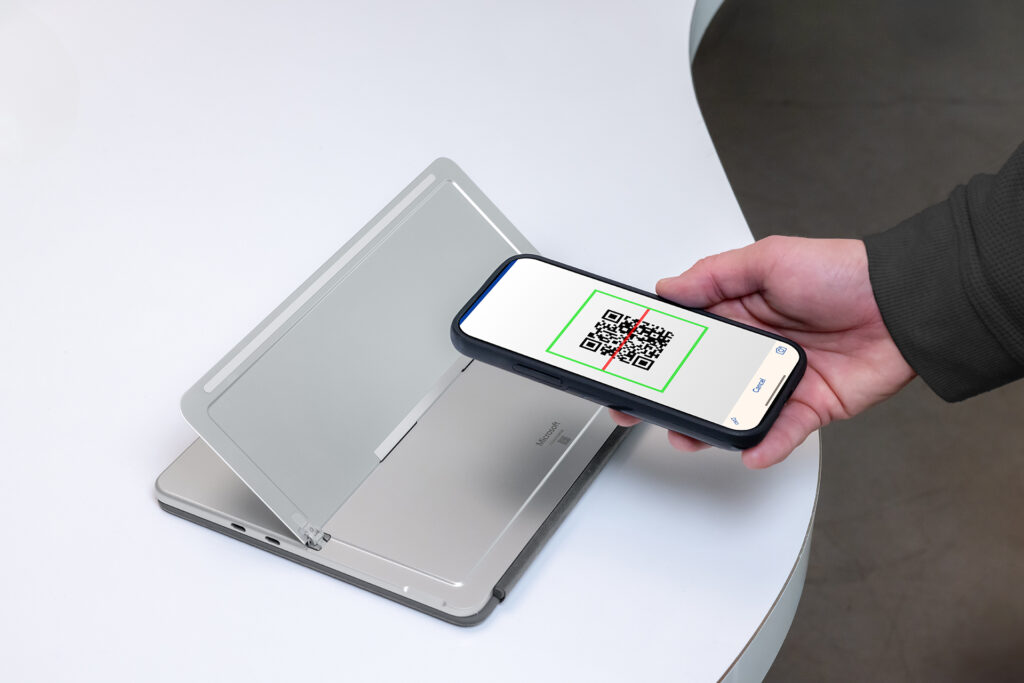
Seguridad y confianza, integradas en todos los dispositivos Surface Hacemos de la seguridad nuestra principal prioridad en Microsoft, por encima de todas las demás características. Estudiantes, familias, educadores e instituciones confían en Microsoft para impulsar el aprendizaje y proteger los datos. Los dispositivos Surface se basan en esa confianza con seguridad de nivel empresarial, administración simplificada a través de Microsoft Intune e integración profunda con Microsoft Entra y Purview para ayudar a las escuelas a controlar el acceso, proteger la información confidencial y gobernar la IA de manera responsable a medida que evolucionan las necesidades del aula. Juntas, estas herramientas ayudan a defender los dispositivos y los datos de su escuela, al tiempo que ponen en el centro las necesidades de seguridad, privacidad y cumplimiento de los estudiantes, educadores y distritos escolares.
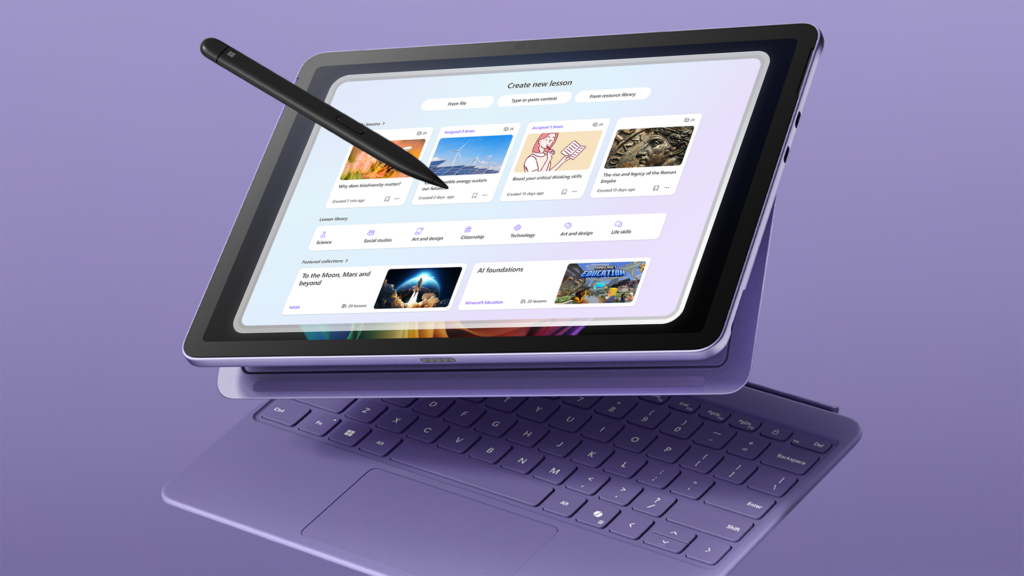
Experiencias con dispositivos que apoyan el aprendizaje natural Los estudiantes aprenden mejor cuando pueden interactuar con el contenido de maneras que se sienten intuitivas. Surface Pro admite la entrada manuscrita digital conSlim Peni, la entrada de voz con Studio Mics y la interacción de lenguaje natural con Copilotii. Estas características ayudan a los estudiantes a expresarse y mantenerse comprometidos a su manera.
Fiables y adaptables para la jornada escolar Los educadores necesitan dispositivos que sean rápidos, duraderos y estén listos para un día completo de aprendizaje. Los equipos Surface Copilot+ están diseñados para durar y sonfáciles de reparariii. Sus diseños livianos y su batería que dura todo el día los hacen fáciles de transportar y usar en aulas, bibliotecas, laboratorios y hogares.
Inclusivo y colaborativo por diseño El aprendizaje es tanto personal como social. Los equipos de Surface Copilot+ funcionan a la perfección con Microsoft 365 para admitir la colaboración a través de Microsoft Teams, OneNote y otras herramientas conocidas. Las características de accesibilidad integradas, junto con SurfaceAdaptive Kit y Microsoft Adaptive Accessories, ayudan a los estudiantes a personalizar su experiencia y mantenerse conectados en cualquier entorno de aprendizaje.
Listo para las herramientas que las escuelas ya utilizan Los PC Surface Copilot+ están diseñados para satisfacer toda la gama de necesidades de aprendizaje al ofrecer el rendimiento y la experiencia necesarios para las herramientas educativas de las que los estudiantes y educadores dependen todos los días. Las aplicaciones comunes como TestNav para las evaluaciones, Google Classroom para las tareas, Minecraft Education para STEM, Adobe Express para la creatividad y las tecnologías de asistencia como JAWS están listas para usar en los dispositivos Surface con procesadores Snapdragon X Series e Intel Core Ultra (Series 2).
Con la confianza de los educadores, evoluciona con sus necesidades
En todo el mundo, las escuelas que durante mucho tiempo han confiado en Surface continúan con la inversión en nuevos dispositivos que respaldan el futuro del aprendizaje. Sus experiencias reflejan muchas de las mismas prioridades que escuchamos durante el desarrollo de los PC Surface Copilot+: rendimiento, fiabilidad, flexibilidad y la capacidad de desbloquear el potencial de la IA en el aula. Estas escuelas continúan con le elección de dispositivos Surface no solo por la tecnología en sí, sino porque confían en que evolucionarán junto con sus necesidades.
En la Royal Grammar School de Newcastle, en el Reino Unido, Surface ya está arraigado de manera profunda en la enseñanza y el aprendizaje. Ahora, la escuela explora cómo las PC Copilot+ pueden mejorar aún más la colaboración y la participación de los estudiantes a través de la IA en el dispositivo.
«No cumpliríamos con nuestro deber si no incorporáramos la tecnología del siglo XXI en nuestro plan de estudios. Los educadores van a tener que dedicar un tiempo a considerar la elección del dispositivo y las aplicaciones utilizadas para aprovechar el poder de la IA y las posibilidades de apoyar el aprendizaje de nuestros estudiantes. El uso del dispositivo Surface en el aula ha cambiado por completo la dinámica».
— Sarah Buist, jefa de estrategia digital, Royal Grammar School Newcastle
En Japón, la Junta de Educación de la Prefectura de Aichi ha implementado dispositivos Surface Pro en más de 200 escuelas secundarias. Los profesores han elogiado la rápida velocidad de procesamiento y las grandes pantallas táctiles, que hacen que las tareas diarias, como la calificación digital, sean más intuitivas y eficientes. En combinación con Microsoft 365 Copilot, también han comenzado a ver un importante ahorro de tiempo en su trabajo diario.
«La nueva Surface es fácil de usar gracias a su rápida velocidad de procesamiento. La gran pantalla permite un manejo sencillo al tacto, lo que facilita la clasificación digital. Antes, la clasificación a mano tomaba una hora, pero ahora solo toma unos 40 minutos.
– Haruhiko Goto, coordinador jefe de la Escuela Secundaria Super Science, Escuela Secundaria Ichinomiya de la Prefectura de Aichi
Seguridad y gestión diseñadas para la TI educativa
Surface lidera el ecosistema de Windows en innovación de seguridad. Diseñada y creada por Microsoft, Surface ayuda a las escuelas a proteger los datos de los estudiantes, simplificar la administración de TI y reducir el riesgo en cada capa del dispositivo, desde el silicio hasta la nube.
Seguridad que comienza en el núcleo Los equipos de Surface Copilot+ son equipos de núcleo seguro con Microsoft Pluton integrado. Pluton es un chip de seguridad diseñado por Microsoft integrado directo en el procesador. Protege datos confidenciales como contraseñas e inicios de sesión, incluso si un dispositivo se pierde o es robado. Las actualizaciones se entregan de manera automática, a través de Windows Update, por lo que las escuelas siempre tienen las protecciones más recientes sin herramientas ni esfuerzo adicionales.
Surface es seguro por diseño y seguro de forma predeterminada Todos los dispositivos Surface vienen con las características de seguridad de Windows 11 Pro habilitadas desde el primer momento, lo que minimiza el tiempo de configuración y reduce el riesgo. El firmware, los controladores y las actualizaciones del sistema operativo se entregan a través de un único canal de confianza, Windows Update. Este enfoque unificado simplifica la gestión, reduce el número de herramientas que los equipos de TI necesitan respaldar y ayuda a las escuelas a responder a las amenazas más rápido, mientras se mantienen enfocadas en la enseñanza y el aprendizaje.
IA que funciona para el aula
Transformación del aula con IA en el dispositivo, impulsada por la NPU
Los PC Surface Copilot+ están diseñados para satisfacer las necesidades de las aulas actuales y respaldar futuras innovaciones de IA que darán forma a la enseñanza y el aprendizaje. Estas experiencias se ejecutan a nivel local en el dispositivo mediante una unidad de procesamiento neuronal (NPU, por sus siglas en inglés) dedicada, lo que les permite operar de forma rápida, segura y sin depender de Internet. Esto abre nuevas formas para que los estudiantes y educadores mejoren la instrucción, simplifiquen las tareas diarias y creen experiencias en el aula más inclusivas.
Estas son solo algunas de las formas en que los PC Surface Copilot+ dan vida a la IA en el aula, con cada experiencia impulsada por la NPU y con más innovaciones por venir.
Microsoft Learning Zone: IA que empodera a todos los educadores Diseñado para la educación,Microsoft Learning Zoneiv es una aplicación gratuita impulsada por IA que llegará a las PC Copilot+, disponible en versión preliminar pública a finales de este año. Utiliza el procesamiento local de IA para crear lecciones personalizadas, adaptar contenido de fuentes confiables como OpenStax, generar juegos interactivos con Kahoot y realizar un seguimiento del progreso de los estudiantes, lo que ahorra tiempo y hace que la experiencia en el aula sea más flexible y atractiva.
Click to Do (vista previa): Soporte personalizado al alcance de su mano Click to Dov permite a los estudiantes resaltar texto o imágenes y recibir ayuda contextual al instante, como resumir un párrafo o explicar un gráfico. Activada con la tecla de Windows y un clic, esta función impulsada por IA se ejecuta por completo en el dispositivo, por medio de la NPU para brindar soporte rápido, seguro y siempre disponible cuando lo necesiten.
Características de accesibilidad: Inclusivas por diseño e impulsadas por AI Los PC Surface Copilot+ incluyen herramientas integradas que ayudan a más estudiantes a participar de manera plena en el aprendizaje. Voice Accessvi ahora ofrece una mayor flexibilidad y una forma más natural de navegar mediante el habla, al mejorar las herramientas de interacción de voz anteriores con tiempos de respuesta más rápidos y compatibilidad con comandos conversacionales. Los subtítulos en vivovii proporcionan subtítulos y traducciones en tiempo real para el contenido hablado. Ambos cuentan con la tecnología de la NPU para ofrecer un rendimiento instantáneo en varios idiomas, lo que permite aulas más inclusivas y accesibles.
Dado que el soporte de Windows 10 finaliza el 14 de octubre de 2025, ahora es el momento de modernizar la flota de dispositivos de su escuela con Windows 11. Los nuevos Surface Laptop de 13 pulgadas y Surface Pro for Business de 12 pulgadas, parte de la cartera de PC Surface Copilot+, estarán disponibles para las instituciones educativas a partir del 22 de julio. Estos dispositivos son seguros por diseño y de forma predeterminada con seguridad incorporada para ayudar a protegerse contra las amenazas cibernéticas en evolución e incluyen un nuevo silicio capaz de 40+ TOPS (billones de operaciones por segundo). Los ordenadores Copilot+ ofrecen una batería que dura todo el día para apoyar el aprendizaje en cualquier lugar, un potente rendimiento para la multitarea y la creación de contenidos, y experiencias de IA diseñadas en específico para la educación.Viii
Estos nuevos dispositivos amplían la cartera de PC de Surface Copilot+ y ofrecen a las escuelas opciones flexibles para adaptar el dispositivo adecuado a cada función. Ya sea que capaciten a los equipos de TI, apoyen a los educadores o permitan que los estudiantes aprendan de formas más personalizadas y accesibles, hay un PC Surface Copilot+ que se adapta a sus necesidades.
ii Es posible que se apliquen límites de edad mínima para el uso de Copilot y ciertas funciones de IA. Detalles
iii Componentes de repuesto disponibles en línea Tienda de Microsoft y iFixIt para reparaciones fuera de garantía. Los componentes pueden ser reemplazados por personas con el conocimiento y la experiencia para reparar dispositivos electrónicos de la siguiente manera: Guía de servicio de Microsoft. Es posible que también se requieran herramientas de Microsoft (se venden por separado). La disponibilidad de componentes de repuesto y las opciones de servicio pueden variar según el producto, el mercado y con el tiempo. Ver Información de autorreparación para el dispositivo Surface – Soporte técnico de Microsoft. Abrir y/o reparar un dispositivo puede presentar descargas eléctricas, daños al dispositivo, riesgo de incendio y lesiones personales, y otros peligros. Tengan cuidado si realiza reparaciones de autoservicio. A menos que lo exija la ley, los daños causados durante la reparación no están cubiertos por la garantía limitada de hardware de Microsoft ni por los planes de protección.
iv Microsoft Learning Zone está disponible con una licencia de Copilot+ PC y Microsoft Education (A1, A3, A5). La disponibilidad inicial será solo en inglés.
v Las acciones de imagen y texto disponibles de Click to DO (vista previa) pueden variar según el dispositivo, la región, el idioma y el conjunto de caracteres. Se requiere suscripción para algunas acciones. Click to Do llegará al Espacio Económico Europeo a finales de 2025. Ver aka.ms/copilotpluspcs
vi Acceso por voz con comandos flexibles ya disponible en PC Copilot+ con procesador Snapdragon X Series. Admite varios idiomas, algunas funciones solo están disponibles en inglés. Descubran las novedades de Voice Access.
vii Traducción de subtítulos de video y audio al inglés de 40+ idiomas y de 27 idiomas al chino (simplificado). Ver aka.ms/copilotpluspcs
viii La duración de la batería varía de manera significativa según el uso, la configuración de la red y las funciones, la intensidad de la señal, los ajustes y otros factores. Consulten aka.ms/SurfaceBatteryPerformance para obtener más detalles.
AWS Deadline Cloud has expanded its support for Unreal Engine in its Service-Managed Fleets. AWS Deadline Cloud is a fully managed service that simplifies render management for teams creating computer-generated graphics and visual effects using industry-standard tools for gaming, film, television, web content, and more.
With this new feature, you can submit Unreal Engine 5.4, 5.5 or 5.6 projects to Deadline Cloud for rendering, without needing to configure or manage compute infrastructure. Getting started is simple with an easy-to-install plugin, available on the AWS Console or in GitHub. Once installed, you can easily submit jobs directly from Unreal Engine’s Movie Render Queue. AWS Deadline Cloud automatically handles the provisioning and elastic scaling of compute resources required for rendering your projects.
Deadline Cloud Unreal Engine support is available in all AWS Regions where Deadline Cloud is offered.
AWS Deadline Cloud has expanded its support for Unreal Engine in its Service-Managed Fleets. AWS Deadline Cloud is a fully managed service that simplifies render management for teams creating computer-generated graphics and visual effects using industry-standard tools for gaming, film, television, web content, and more. With this new feature, you can submit Unreal Engine 5.4, 5.5 or 5.6 projects to Deadline Cloud for rendering, without needing to configure or manage compute infrastructure. Getting started is simple with an easy-to-install plugin, available on the AWS Console or in GitHub. Once installed, you can easily submit jobs directly from Unreal Engine’s Movie Render Queue. AWS Deadline Cloud automatically handles the provisioning and elastic scaling of compute resources required for rendering your projects. Deadline Cloud Unreal Engine support is available in all AWS Regions where Deadline Cloud is offered. For more information, please visit the Deadline Cloud product page and our Deadline Cloud for Unreal Engine GitHub repository.