
Publicado el Deja un comentario

AWS HealthOmics introduces third-party Git repository support for workflow creation

AWS HealthOmics announces third-party Git repository integration via AWS CodeConnections for workflow creation, enabling bioinformaticians and researchers to seamlessly connect their existing source code management repositories to HealthOmics. This new capability allows customers to automatically pull workflow definitions, parameter templates, and README files directly from GitHub, GitLab, or Bitbucket repositories without intermediate steps. AWS HealthOmics is a HIPAA-eligible service that helps healthcare and life sciences customers accelerate scientific breakthroughs with fully managed biological data stores and workflows.

Git integrations can streamline bioinformatics workflow management by eliminating multiple manual steps required to stage and update workflow files. Customers can now specify a particular branch, tag, or commit ID to ensure version control and reproducibility while maintaining their existing development processes. This feature is particularly valuable for organizations with established bioinformatics pipelines that want to leverage HealthOmics’ scalable compute capabilities while preserving their third-party Git-based collaboration workflows. By connecting directly to versioned source repositories, teams can maintain a single source of truth for their workflow code, simplifying change management and enhancing reproducibility.

Git integration for workflow creation is now supported in all regions where AWS HealthOmics is available: US East (N. Virginia), US West (Oregon), Europe (Frankfurt, Ireland, London), Asia Pacific (Singapore), and Israel (Tel Aviv).

To learn more about integrating Git repositories with your HealthOmics workflows, see the AWS HealthOmics documentation.

 

​AWS HealthOmics announces third-party Git repository integration via AWS CodeConnections for workflow creation, enabling bioinformaticians and researchers to seamlessly connect their existing source code management repositories to HealthOmics. This new capability allows customers to automatically pull workflow definitions, parameter templates, and README files directly from GitHub, GitLab, or Bitbucket repositories without intermediate steps. AWS HealthOmics is a HIPAA-eligible service that helps healthcare and life sciences customers accelerate scientific breakthroughs with fully managed biological data stores and workflows. Git integrations can streamline bioinformatics workflow management by eliminating multiple manual steps required to stage and update workflow files. Customers can now specify a particular branch, tag, or commit ID to ensure version control and reproducibility while maintaining their existing development processes. This feature is particularly valuable for organizations with established bioinformatics pipelines that want to leverage HealthOmics’ scalable compute capabilities while preserving their third-party Git-based collaboration workflows. By connecting directly to versioned source repositories, teams can maintain a single source of truth for their workflow code, simplifying change management and enhancing reproducibility. Git integration for workflow creation is now supported in all regions where AWS HealthOmics is available: US East (N. Virginia), US West (Oregon), Europe (Frankfurt, Ireland, London), Asia Pacific (Singapore), and Israel (Tel Aviv). To learn more about integrating Git repositories with your HealthOmics workflows, see the AWS HealthOmics documentation.  

Publicado el Deja un comentario

Amazon Application Recovery Controller now supports Region switch

Amazon Application Recovery Controller (ARC) now supports switching AWS Regions for multi-Region application recovery. This automated feature allows you to orchestrate the specific steps to switch operating your multi-Region application out of another AWS Region. It provides dashboards for real-time visibility and logging that you can use throughout the recovery process. This saves hours of engineering effort and eliminates the operational overhead previously required to complete failover steps, create custom dashboards, and manually gather evidence of a successful recovery for applications across your organization and hosted in multiple AWS accounts. Region Switch supports failover and failback for active-passive multi-Region approaches, and removing and adding an AWS Region for an application with active-active multi-Region approaches.

ARC Region switch is a highly available solution for multi-Region recovery, and runs independently in each Region it operates in. When you create a Region switch plan, it is replicated to all the Regions your application operates in. This removes dependencies on the Region you are leaving for your recovery.

To get started, build a Region switch plan using the ARC console, API, or CLI. A Region switch plan allows you to create the specific workflow required to recover your applications in another Region. Once created, Region switch will evaluate your plan every 30 minutes to ensure correct configuration and readiness for recovery. When running a test or recovering from an operational event, you can use the ARC dashboard to monitor your applications’ recovery.

ARC Region switch is available in all commercial AWS Regions. To learn more, please refer to the ARC Region switch documentation. 


​Amazon Application Recovery Controller (ARC) now supports switching AWS Regions for multi-Region application recovery. This automated feature allows you to orchestrate the specific steps to switch operating your multi-Region application out of another AWS Region. It provides dashboards for real-time visibility and logging that you can use throughout the recovery process. This saves hours of engineering effort and eliminates the operational overhead previously required to complete failover steps, create custom dashboards, and manually gather evidence of a successful recovery for applications across your organization and hosted in multiple AWS accounts. Region Switch supports failover and failback for active-passive multi-Region approaches, and removing and adding an AWS Region for an application with active-active multi-Region approaches.
ARC Region switch is a highly available solution for multi-Region recovery, and runs independently in each Region it operates in. When you create a Region switch plan, it is replicated to all the Regions your application operates in. This removes dependencies on the Region you are leaving for your recovery.
To get started, build a Region switch plan using the ARC console, API, or CLI. A Region switch plan allows you to create the specific workflow required to recover your applications in another Region. Once created, Region switch will evaluate your plan every 30 minutes to ensure correct configuration and readiness for recovery. When running a test or recovering from an operational event, you can use the ARC dashboard to monitor your applications’ recovery.
ARC Region switch is available in all commercial AWS Regions. To learn more, please refer to the ARC Region switch documentation.   

Publicado el Deja un comentario

AWS Transfer Family is now available in AWS Asia Pacific (Thailand) region

Customers in AWS Asia Pacific (Thailand) Region can now use AWS Transfer Family for file transfers over Secure File Transfer Protocol (SFTP), File Transfer Protocol (FTP), FTP over SSL (FTPS) and Applicability Statement 2 (AS2).

AWS Transfer Family provides fully managed file transfers for Amazon Simple Storage Service (Amazon S3) and Amazon Elastic File System (Amazon EFS) over SFTP, FTP, FTPS and AS2 protocols. In addition to file transfers, Transfer Family enables common file processing and event-driven automation for managed file transfer (MFT) workflows, helping customers to modernize and migrate their business-to-business file transfers to AWS.

To learn more about AWS Transfer Family, visit our product page and user-guide. See the AWS Region Table for complete regional availability information.


​Customers in AWS Asia Pacific (Thailand) Region can now use AWS Transfer Family for file transfers over Secure File Transfer Protocol (SFTP), File Transfer Protocol (FTP), FTP over SSL (FTPS) and Applicability Statement 2 (AS2). AWS Transfer Family provides fully managed file transfers for Amazon Simple Storage Service (Amazon S3) and Amazon Elastic File System (Amazon EFS) over SFTP, FTP, FTPS and AS2 protocols. In addition to file transfers, Transfer Family enables common file processing and event-driven automation for managed file transfer (MFT) workflows, helping customers to modernize and migrate their business-to-business file transfers to AWS. To learn more about AWS Transfer Family, visit our product page and user-guide. See the AWS Region Table for complete regional availability information.  

Publicado el Deja un comentario

Amazon EC2 C7i instances are now available in Asia Pacific (Jakarta) Region

Starting today, Amazon Elastic Compute Cloud (Amazon EC2) C7i instances powered by custom 4th Gen Intel Xeon Scalable processors (code-named Sapphire Rapids) are available in the Asia Pacific (Jakarta) Region. C7i instances are supported by custom Intel processors, available only on AWS, and offer up to 15% better performance over comparable x86-based Intel processors utilized by other cloud providers.

C7i instances deliver up to 15% better price-performance versus C6i instances and are a great choice for all compute-intensive workloads, such as batch processing, distributed analytics, ad-serving, and video encoding. C7i instances offer larger instance sizes, up to 48xlarge, and two bare metal sizes (metal-24xl, metal-48xl). These bare-metal sizes support built-in Intel accelerators: Data Streaming Accelerator, In-Memory Analytics Accelerator, and QuickAssist Technology that are used to facilitate efficient offload and acceleration of data operations and optimize performance for workloads.

C7i instances support new Intel Advanced Matrix Extensions (AMX) that accelerate matrix multiplication operations for applications such as CPU-based ML. Customers can attach up to 128 EBS volumes to a C7i instance vs. up to 28 EBS volumes to a C6i instance. This allows processing of larger amounts of data, scale workloads, and improved performance over C6i instances.

To learn more, visit Amazon EC2 C7i Instances. To get started, see the AWS Management Console.


​Starting today, Amazon Elastic Compute Cloud (Amazon EC2) C7i instances powered by custom 4th Gen Intel Xeon Scalable processors (code-named Sapphire Rapids) are available in the Asia Pacific (Jakarta) Region. C7i instances are supported by custom Intel processors, available only on AWS, and offer up to 15% better performance over comparable x86-based Intel processors utilized by other cloud providers. C7i instances deliver up to 15% better price-performance versus C6i instances and are a great choice for all compute-intensive workloads, such as batch processing, distributed analytics, ad-serving, and video encoding. C7i instances offer larger instance sizes, up to 48xlarge, and two bare metal sizes (metal-24xl, metal-48xl). These bare-metal sizes support built-in Intel accelerators: Data Streaming Accelerator, In-Memory Analytics Accelerator, and QuickAssist Technology that are used to facilitate efficient offload and acceleration of data operations and optimize performance for workloads. C7i instances support new Intel Advanced Matrix Extensions (AMX) that accelerate matrix multiplication operations for applications such as CPU-based ML. Customers can attach up to 128 EBS volumes to a C7i instance vs. up to 28 EBS volumes to a C6i instance. This allows processing of larger amounts of data, scale workloads, and improved performance over C6i instances. To learn more, visit Amazon EC2 C7i Instances. To get started, see the AWS Management Console.  

Publicado el Deja un comentario

Amazon Connect now supports AWS CloudFormation for message template attachments

Amazon Connect now supports AWS CloudFormation for Outbound Campaign message template attachments, enabling you to create, manage, and deploy these template attachments using AWS CloudFormation. This enhancement allows customers to define and deploy attachments, such as images or documents, as part of the existing MessageTemplate CloudFormation resource.

Message template attachments are used in outbound email campaigns to enrich content and improve engagement. With this launch, customers can now manage attachments programmatically through infrastructure as code, ensuring consistency, repeatability, and automation across staging, test, and production environments.

This feature is available in all AWS Regions where Amazon Connect Outbound Campaigns are supported. For more information, see the AWS Region table. To learn more, see Message templates in the Amazon Connect Administrator Guide or visit the Amazon Connect product page.


​Amazon Connect now supports AWS CloudFormation for Outbound Campaign message template attachments, enabling you to create, manage, and deploy these template attachments using AWS CloudFormation. This enhancement allows customers to define and deploy attachments, such as images or documents, as part of the existing MessageTemplate CloudFormation resource. Message template attachments are used in outbound email campaigns to enrich content and improve engagement. With this launch, customers can now manage attachments programmatically through infrastructure as code, ensuring consistency, repeatability, and automation across staging, test, and production environments. This feature is available in all AWS Regions where Amazon Connect Outbound Campaigns are supported. For more information, see the AWS Region table. To learn more, see Message templates in the Amazon Connect Administrator Guide or visit the Amazon Connect product page.  

Publicado el Deja un comentario

Desglose de datos de IA: ¿Qué sucede cuando le das Copilot a 20 mil personas?

julio 25, 2025

Desglose de datos de IA: ¿Qué sucede cuando le das Copilot a 20 mil personas?

Lecciones para todos los líderes desde un emblemático experimento del gobierno del Reino Unido.

Gráfico circular compuesto por figuras humanas de colores azul, rojo, verde y amarillo, que representan diferentes categorías o grupos. Algunas figuras están dispersas fuera del círculo principal, indicando posiblemente datos fuera del promedio o categorías adicionales.

Ilustración de Alex Robbins

Esta historia aparece en el boletín de WorkLab. Regístrense aquí.

Todo líder quiere saber: ¿cómo convertir la IA en resultados reales a escala?

En un estudio único en su tipo, el gobierno del Reino Unido entregó Microsoft 365 Copilot a 20 mil empleados durante tres meses. Los hallazgos, basados en los comentarios de los participantes y los datos de uso, ofrecen una visión poco común de cómo funciona la IA a escala en un entorno complejo del sector público. Si bien los resultados reflejan experiencias autoinformadas, sugieren que con el apoyo adecuado, la IA puede ayudar incluso a las organizaciones más grandes a operar más como Empresas Frontera.

Lo que hicieron

La oficina de Servicios Digitales del Gobierno del Reino Unido entregó Copilot a participantes de 12 departamentos, incluidos el Ministerio del Interior, el Ministerio de Justicia y el Departamento de Medio Ambiente, Alimentación y Asuntos Rurales. Los empleados recibieron apoyo de incorporación en forma de preguntas frecuentes, hojas de consejos, videos, sesiones comunitarias y talleres. Para evaluar el impacto, los investigadores del gobierno recopilaron datos de uso y comentarios directos de los empleados.

Los trabajadores del gobierno informan que ahorran tiempo con Copilot

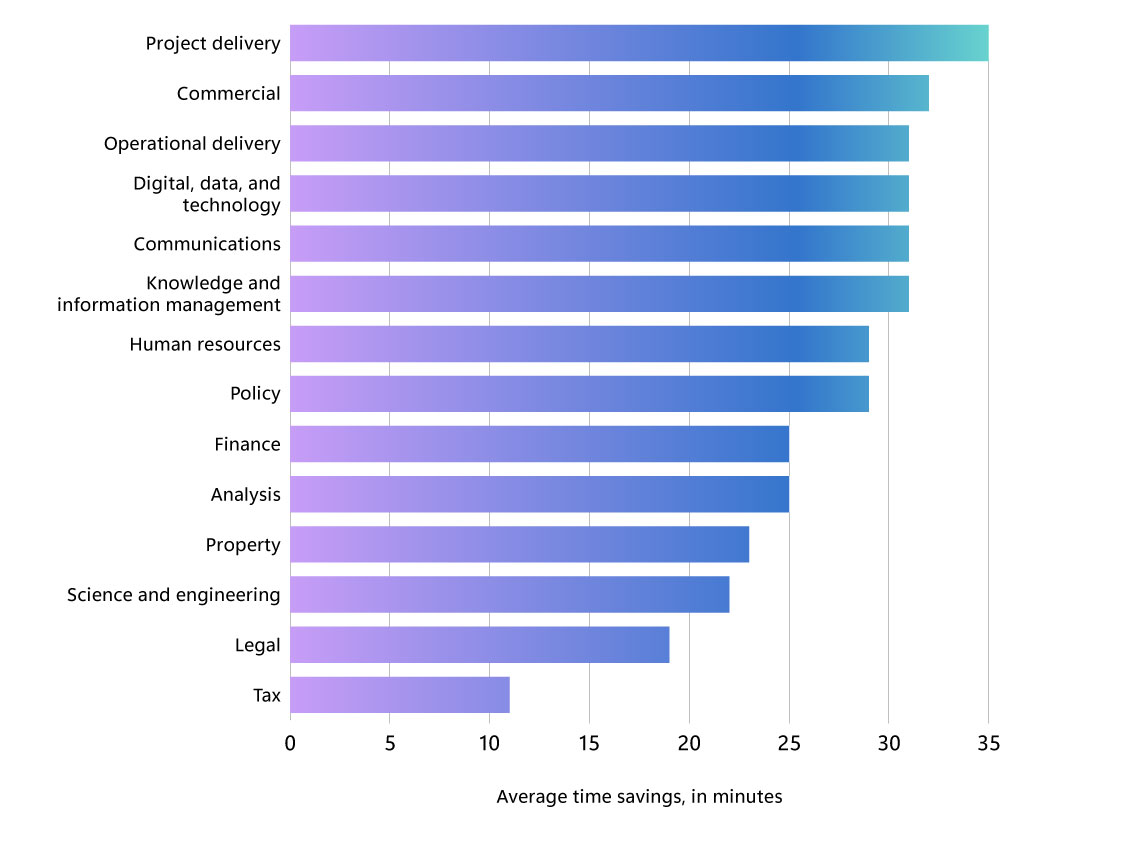
En un estudio de percepción de usuarios del Reino Unido, 20 mil trabajadores gubernamentales que usaron Copilot durante tres meses informaron haber ahorrado tiempo en todos los roles.

Un gráfico de barras que desglosa el ahorro promedio diario de tiempo, por función, para 20,000 trabajadores del gobierno del Reino Unido después de usar Copilot durante tres meses, según una encuesta. El ahorro promedio para todos los trabajadores fue de 25 minutos al día, encabezado por el personal de entrega de proyectos, quienes reportaron ahorrar más de 35 minutos diarios. Las seis funciones principales reportaron ahorros de al menos 30 minutos por día, mientras que los trabajadores del área fiscal reportaron el menor ahorro de tiempo, con 11 minutos diarios.

Lo que encontraron

En promedio, los empleados que participaron en el estudio de percepción del usuario informaron haber ahorrado más de 25 minutos al día con Copilot, casi dos semanas al año. Más del 70% dijo que Copilot les ayudó a dedicar menos tiempo a tareas rutinarias y más tiempo al trabajo estratégico.

Más allá de la productividad, el estudio sacó a la luz un fuerte sentimiento positivo: más del 80% dijo que no querría renunciar a Copilot. Y muchos no tuvieron que hacerlo: nueve de los 12 departamentos optaron por continuar con sus licencias, y desde entonces el gobierno del Reino Unido se ha expandido a 31 mil asientos de Copilot.

Estos resultados se obtuvieron en solo tres meses, de acuerdo con nuestra investigación anterior que muestra que puede llevar hasta 11 semanas comenzar a desarrollar el hábito de la IA. El informe del gobierno del Reino Unido también señala que «hubo fuertes comentarios positivos en torno a los agentes de Microsoft 365 Copilot, con muchos departamentos ansiosos por explorar más la herramienta».

Qué significa

El estudio del gobierno del Reino Unido muestra que la adopción de IA a gran escala no tiene por qué ser lenta. Con una planificación cuidadosa y una orientación reflexiva, las organizaciones pueden desbloquear un impacto significativo en solo unos meses. El ahorro de tiempo reportado equivale a devolver a 1.130 funcionarios públicos un año completo, cada año, para concentrarse en un trabajo de mayor valor.

Para los líderes, el mensaje es claro: la IA puede ofrecer un ROI medible, rápido. Pero el éxito depende de algo más que el acceso: requiere un despliegue intencional y una cultura lista para aceptar el cambio. El enfoque del gobierno del Reino Unido ofrece un modelo de cómo las organizaciones grandes y complejas pueden avanzar para convertirse en empresas de frontera.

The post Desglose de datos de IA: ¿Qué sucede cuando le das Copilot a 20 mil personas? appeared first on Source LATAM.


​The post Desglose de datos de IA: ¿Qué sucede cuando le das Copilot a 20 mil personas? appeared first on Source LATAM.  

Publicado el Deja un comentario

Announcing readme file support for AWS HealthOmics workflows

Today, AWS HealthOmics introduces enhanced workflow documentation capabilities with the addition of readme file support. This new feature allows bioinformaticians and researchers to attach comprehensive documentation, implementation details, and diagrams directly to their bioinformatics workflows and workflow versions. AWS HealthOmics is a HIPAA-eligible service that helps healthcare and life sciences customers accelerate scientific breakthroughs with fully managed biological data stores and workflows.

The readme file feature improves workflow management by providing a centralized location for critical workflow documentation, enabling more effective knowledge sharing across research teams. Users can now document parameters, input requirements, output formats, and usage instructions within the workflow itself, eliminating the need for separate documentation systems. This capability is particularly valuable for organizations with shared workflows, where multiple scientists need to understand and correctly execute complex bioinformatics pipelines. Readme files can be viewed directly in the AWS Management Console or programmatically accessed via GetWorkflow API calls, and can be updated as workflows evolve.

Readme file support is now available in all regions where AWS HealthOmics is available: US East (N. Virginia), US West (Oregon), Europe (Frankfurt, Ireland, London), Asia Pacific (Singapore), and Israel (Tel Aviv).

To learn more about creating and managing workflow readme files, see the AWS HealthOmics documentation.


​Today, AWS HealthOmics introduces enhanced workflow documentation capabilities with the addition of readme file support. This new feature allows bioinformaticians and researchers to attach comprehensive documentation, implementation details, and diagrams directly to their bioinformatics workflows and workflow versions. AWS HealthOmics is a HIPAA-eligible service that helps healthcare and life sciences customers accelerate scientific breakthroughs with fully managed biological data stores and workflows. The readme file feature improves workflow management by providing a centralized location for critical workflow documentation, enabling more effective knowledge sharing across research teams. Users can now document parameters, input requirements, output formats, and usage instructions within the workflow itself, eliminating the need for separate documentation systems. This capability is particularly valuable for organizations with shared workflows, where multiple scientists need to understand and correctly execute complex bioinformatics pipelines. Readme files can be viewed directly in the AWS Management Console or programmatically accessed via GetWorkflow API calls, and can be updated as workflows evolve. Readme file support is now available in all regions where AWS HealthOmics is available: US East (N. Virginia), US West (Oregon), Europe (Frankfurt, Ireland, London), Asia Pacific (Singapore), and Israel (Tel Aviv). To learn more about creating and managing workflow readme files, see the AWS HealthOmics documentation.  

Publicado el Deja un comentario

Amazon Connect now supports AWS CloudFormation for quick responses

Amazon Connect now supports AWS CloudFormation for quick responses, enabling customers to deploy and manage quick responses using AWS CloudFormation templates. Quick responses allow contact center agents to access pre-configured messages to respond consistently and efficiently to common customer inquiries. With AWS CloudFormation, administrators can now define and deploy these quick responses across environments in a scalable and repeatable way.

Using AWS CloudFormation, organizations can standardize agent communications and reduce manual configuration between Amazon Connect instances. For example, you can use AWS CloudFormation templates to roll out updated response sets for seasonal campaigns or regulatory compliance across multiple Connect environments. This launch simplifies deployment and integrates seamlessly with continuous delivery pipelines.

This feature is available in all AWS Regions where Amazon Connect is offered. For a full list of supported Regions, see the AWS Region table. To learn more, see Quick responses in the Amazon Connect Administrator Guide or visit the Amazon Connect product page.


​Amazon Connect now supports AWS CloudFormation for quick responses, enabling customers to deploy and manage quick responses using AWS CloudFormation templates. Quick responses allow contact center agents to access pre-configured messages to respond consistently and efficiently to common customer inquiries. With AWS CloudFormation, administrators can now define and deploy these quick responses across environments in a scalable and repeatable way. Using AWS CloudFormation, organizations can standardize agent communications and reduce manual configuration between Amazon Connect instances. For example, you can use AWS CloudFormation templates to roll out updated response sets for seasonal campaigns or regulatory compliance across multiple Connect environments. This launch simplifies deployment and integrates seamlessly with continuous delivery pipelines. This feature is available in all AWS Regions where Amazon Connect is offered. For a full list of supported Regions, see the AWS Region table. To learn more, see Quick responses in the Amazon Connect Administrator Guide or visit the Amazon Connect product page.  

Publicado el Deja un comentario

Amazon EC2 M8g and R8g instances now available in Asia Pacific (Hong Kong)

Starting today, Amazon Elastic Compute Cloud (Amazon EC2) M8g and R8g instances are available in AWS Asia Pacific (Hong Kong) region. These instances are powered by AWS Graviton4 processors and deliver up to 30% better performance compared to AWS Graviton3-based instances. Amazon EC2 M8g instances are built for general-purpose workloads, such as application servers, microservices, gaming servers, midsize data stores, and caching fleets. Amazon EC2 R8g instances are ideal for memory-intensive workloads such as databases, in-memory caches, and real-time big data analytics. These instances are built on the AWS Nitro System, which offloads CPU virtualization, storage, and networking functions to dedicated hardware and software to enhance the performance and security of your workloads.

AWS Graviton4-based Amazon EC2 instances deliver the best performance and energy efficiency for a broad range of workloads running on Amazon EC2. These instances offer larger instance sizes with up to 3x more vCPUs and memory compared to Graviton3-based instances. AWS Graviton4 processors are up to 40% faster for databases, 30% faster for web applications, and 45% faster for large Java applications than AWS Graviton3 processors.

To learn more, see Amazon EC2 M8g Instances and Amazon EC2 R8g Instances. To explore how to migrate your workloads to Graviton-based instances, see AWS Graviton Fast Start program and Porting Advisor for Graviton. To get started, see the AWS Management Console.


​Starting today, Amazon Elastic Compute Cloud (Amazon EC2) M8g and R8g instances are available in AWS Asia Pacific (Hong Kong) region. These instances are powered by AWS Graviton4 processors and deliver up to 30% better performance compared to AWS Graviton3-based instances. Amazon EC2 M8g instances are built for general-purpose workloads, such as application servers, microservices, gaming servers, midsize data stores, and caching fleets. Amazon EC2 R8g instances are ideal for memory-intensive workloads such as databases, in-memory caches, and real-time big data analytics. These instances are built on the AWS Nitro System, which offloads CPU virtualization, storage, and networking functions to dedicated hardware and software to enhance the performance and security of your workloads. AWS Graviton4-based Amazon EC2 instances deliver the best performance and energy efficiency for a broad range of workloads running on Amazon EC2. These instances offer larger instance sizes with up to 3x more vCPUs and memory compared to Graviton3-based instances. AWS Graviton4 processors are up to 40% faster for databases, 30% faster for web applications, and 45% faster for large Java applications than AWS Graviton3 processors. To learn more, see Amazon EC2 M8g Instances and Amazon EC2 R8g Instances. To explore how to migrate your workloads to Graviton-based instances, see AWS Graviton Fast Start program and Porting Advisor for Graviton. To get started, see the AWS Management Console.  

Publicado el Deja un comentario

AWS Glue now supports Microsoft Dynamics 365 as a data source

AWS Glue now offers a new native connector for Microsoft Dynamics 365, enabling data engineers to easily integrate data from this enterprise resource planning (ERP) and customer relationship management (CRM) platform. This connector allows AWS Glue users to build efficient extract, transform, and load (ETL) jobs that seamlessly connect to Microsoft Dynamics 365 as a data source.

With this new connector, users can streamline their data integration processes, reducing the complexity and time required to incorporate Microsoft Dynamics 365 data into their AWS-based analytics and business intelligence workflows. Organizations can now leverage the power of AWS Glue’s fully-managed ETL service in conjunction with their Microsoft Dynamics 365 data, enabling more comprehensive insights and data-driven decision-making.

The AWS Glue connector for Microsoft Dynamics 365 is available in all regions where AWS Glue is supported.

To learn more about this new connector and how to get started, visit the AWS Glue documentation.


​AWS Glue now offers a new native connector for Microsoft Dynamics 365, enabling data engineers to easily integrate data from this enterprise resource planning (ERP) and customer relationship management (CRM) platform. This connector allows AWS Glue users to build efficient extract, transform, and load (ETL) jobs that seamlessly connect to Microsoft Dynamics 365 as a data source. With this new connector, users can streamline their data integration processes, reducing the complexity and time required to incorporate Microsoft Dynamics 365 data into their AWS-based analytics and business intelligence workflows. Organizations can now leverage the power of AWS Glue’s fully-managed ETL service in conjunction with their Microsoft Dynamics 365 data, enabling more comprehensive insights and data-driven decision-making. The AWS Glue connector for Microsoft Dynamics 365 is available in all regions where AWS Glue is supported. To learn more about this new connector and how to get started, visit the AWS Glue documentation.